Open WebUI: Self-Hosted ChatGPT Alternative for Local LLMs
Open WebUI brings the ChatGPT experience onto your own infrastructure: Ollama plus any OpenAI-compatible backend behind a modern chat UI with RAG document chat, multi-user auth, voice, prompt tooling, and model management. Privacy-first, offline-capable, and scalable from laptop Docker runs to Kubernetes fleets.
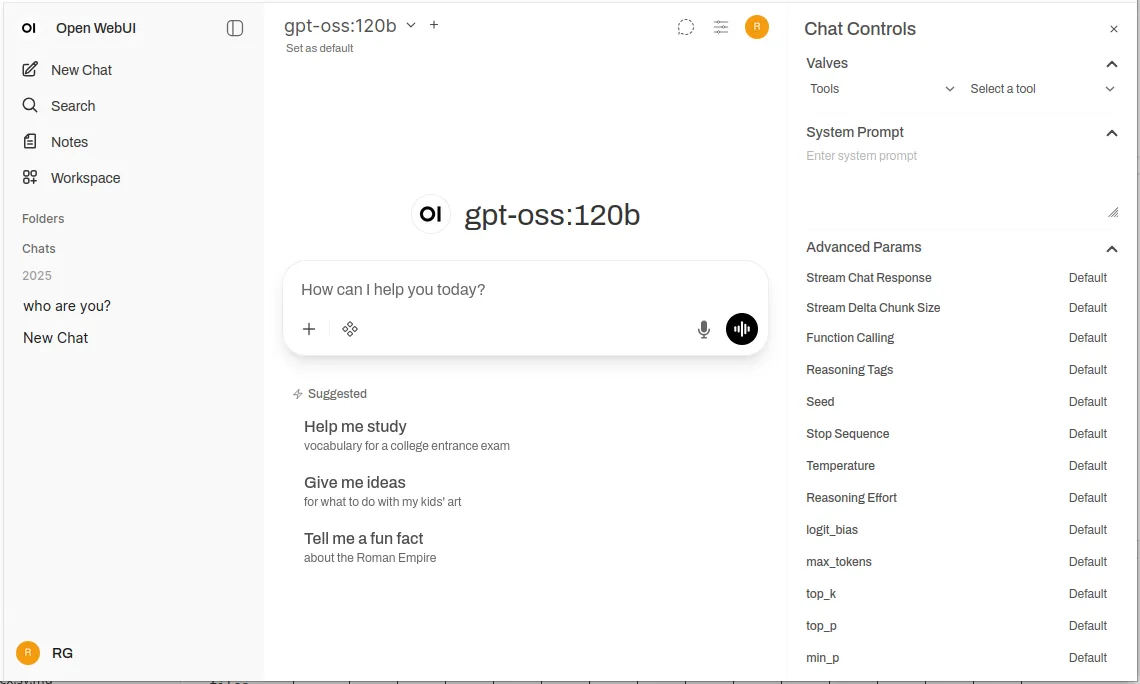 One chat surface over Ollama, vLLM, and any OpenAI-compatible endpoint
Why Self-Host the Chat Layer
Data never leaves the network unless explicitly configured outward. Air-gapped and unreliable-network environments keep full AI assistance paired with local models. Feature parity surprises: document RAG with citations, semantic conversation history, shared prompt templates, per-conversation sampling controls, voice in and out, mobile-responsive theming. Multi-user auth with admin/user/pending roles, per-group model access, and retention policies carries teams and regulated shops.
Install: Docker First
Against existing Ollama:
docker run -d \
  -p 3000:8080 \
  -v open-webui:/app/backend/data \
  --name open-webui \
  --restart always \
  ghcr.io/open-webui/open-webui:main
All-in-one with bundled Ollama (add --gpus all for GPU inference, omit on CPU-only):
docker run -d \
  -p 3000:8080 \
  --gpus all \
  -v ollama:/root/.ollama \
  -v open-webui:/app/backend/data \
  --name open-webui \
  --restart always \
  ghcr.io/open-webui/open-webui:ollama
Production prefers Compose (Ollama service plus WebUI with OLLAMA_BASE_URL, volumes, restart policies) and graduates to Helm (ollama.enabled, ingress host, persistent storage, health checks) for enterprise clusters. Backend choice underneath follows the Ollama to vLLM tradeoff — convenience versus shared-service scheduling.
Configure Backends and Front Door
Any OpenAI-compatible base URL works from Settings → Connections: vLLM, LocalAI, LM Studio, Text Generation WebUI, plus cloud endpoints with keys. Key environment: backend URL, auth toggle, default role, signup switch, admin auto-create email, database URL (SQLite default, PostgreSQL for multi-user), RAG toggle, embedding model (MiniLM fast, MPNet balanced, BGE quality). Production traffic goes behind Nginx or Traefik with TLS, host headers, and WebSocket upgrades — never raw ports on public networks.
Operate It Well
Multi-user scale wants PostgreSQL over SQLite, embedding models matched to resources, and conversation plus embedding caches cutting repeat work. Security baseline: auth always on publicly, TLS everywhere, updates current, firewall-scoped access, secrets in env (never hardcoded), access logs audited, data volumes backed up, Postgres encrypted at rest, rate limits set, content policies defined. Use cases span private research assistants over uploaded notes, team collaboration over shared docs with decision-traceable history, SSO-backed internal chatbots over wikis and policies, classroom deployments with private student data, HIPAA/GDPR clinical and legal querying, and fully offline classified environments.
Troubleshoot Fast
Connection failures mean Ollama down, wrong base URL (service names inside Compose, never localhost), firewall blocks, or empty model lists needing refresh. RAG misses mean missing embedding models, oversized chunks, too few retrieved passages, or off-topic queries. Slowness means missing GPU acceleration, oversized models, or unraised parallelism caps; OOM means smaller models, shorter contexts, fewer concurrent users, more RAM. Auth lockouts mean unset auth flags, missing admin email, stale cookies, or unwritable databases; signup blocks mean disabled flags or restrictive default roles.
Alternatives by Need
Provider-flexible multi-cloud teams suit LibreChat (broad native providers, multi-tenancy, heavier setup). Document-heavy knowledge workflows suit AnythingLLM (workspace isolation, hybrid search with reranking and citations, data connectors, weaker chat polish). Mobile-first users suit LobeChat (PWA experience, thinner enterprise and RAG). Non-technical desktop users suit Jan (bundled zero-config native app, no multi-user or remote). Minimalists suit Chatbox or Ollama-specific single-purpose UIs (Ollama UI, Oterm for SSH/tmux). Vendor-backed compliance needs suit TypingMind Team, BionicGPT, or Dust. Default remains Open WebUI for technical local-model deployments — migrate outward only on demonstrated need.
Summary
One Docker command to ChatGPT-class UX on private infrastructure, Compose for teams, Helm for enterprise, any backend behind one connection setting, RAG plus auth plus voice included. Start bundled, grow into production posture as users arrive.
Self-hosting your chat layer — Open WebUI or an alternative? Share the deployment in the comments below!